

Find the best Lego Mindstorms alternatives and robotics kits for beginners and professionals at Little Robot Shop. Explore options that offer versatile programming tools, sensors, and expansion capabilities for educational robotics projects.
Did you know that The Lego Group declared in October 2022 that Mindstorms would shut down at the end of 2022? That news made this article on “5 Lego Mindstorm Alternatives” one of the most searched queries on search engines amongst Lego lovers.
We’re all Lego fans. Regardless of whether you like building kits or video games, kids of all ages still find excitement in the time-tested brick-building toy.
But if you’re looking for Mindstorms alternatives? You’ve come to the right place! In this article, I’ve listed the top 5 Lego Mindstorms (lego programming kits) alternatives you can buy.
*The product links in this post are affiliate links, which means that if you purchase after following one, I make a small commission from the sale at no additional cost to you. Please see our disclosure page for more information.
5 Lego Mindstorms Alternatives
Before getting into the alternatives to Lego Mindstorms, we should first discuss and understand the concept behind them.

What are Lego Mindstorms?
It is a hardware and software platform for creating programmable robots using Lego building blocks. Each version includes a computer, a set of modular sensors and motors, and technical parts to build the mechanical systems.
Mindstorms was initially designed and launched as a tool to support educational constructivism, but it has since become the first home robotics kit available to a broader audience.
End of an Era! Why was Lego Mindstorms discontinued?
The company in a statement stated “The long-running product line, which mixes software and Lego bricks to make the robots seems to have recently lost its fire, and 24 years after the range initially debuted, Lego is giving up”
That means the end of Lego’s Mindstorms Robot Inventor kit, which allows kids (and adults) to build five different working robot models out of 949 Lego pieces, ranging from a four-legged walker to a bipedal wheeled robot that gives high-fives.
The following alternatives are the best replacements on the market for Mindstorm aficionados.
1. VEX IQ

VEX Robotics is an educational robotics for the entire family. VEX solutions are accessible, scalable, and affordable at all levels of formal and informal education if you’re looking for a kit that’s most similar to Lego Mindstorms.
It is designed for students in elementary and middle school. The Robotics Education & Competition Foundation is hosting the VIQ Challenge, which offers elementary and middle school students engaging, open-ended robotics and research project challenges that develop their STEM (science, technology, engineering, and mathematics) skills through experiential, student-centered learning.
✔️ Pros
- It is built with plastic snap-together pieces that are designed to create highly functional robots needed to help your kid in STEM learning.
- Students can easily build their first robot, and a large number of additional parts allows them to build anything they can imagine as they keep learning.
- Every kit includes a hand tool to make assembly and disassembly for small hands easier.
- Use of VEX IQ (and EDR) is possible with ROBOTC. This will enable students to learn C programming rather than using the exclusive drag-and-drop method used by Lego.
❌ Cons
- The robot does not drive straight
- Robot freezes when it can’t complete the tasks
- The battery is low even when it isn’t
- Robot behaving randomly
2. Arduino Uno Kits (Robot Cars)
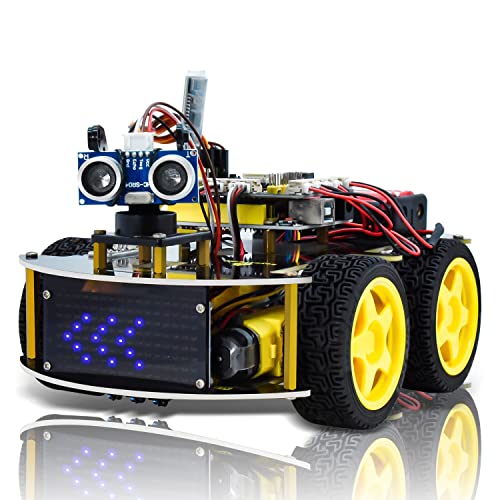
Uno Smart Robot Car is an instructional kit for newcomers to learn how to program with Arduino, put electronics together, and understand robotics. It is an integrated solution designed for Arduino teaching and robotics learning. But as you can see here, there are so many more options than just the car kit.
This robotic vehicle is equipped with an ultrasonic sensor that allows it to identify obstacles in front of it. When an object is detected, the ultrasonic sensor moves to the right and left to calculate the best possible distance for the vehicle to proceed freely.
Instead of attempting to assemble a robot, beginners on the Arduino platform should think about purchasing an Arduino robot kit. Even if you’re an expert in microcontrollers, a full robot kit enables you to quickly improve the original design.
✔️ Pros
- With the Sensor Kit’s components, you can build so many fun apps such as display interfaces, sound detection, alarm systems, light detection, temperature sensing, and much more.
- Although a robot can be built from the ground up, a starter kit is easier to use and ensures compatibility with all attachments.
- Robots can be built with microcontroller units (MCUs) with great success. The excellent compatibility of Arduino boards with a variety of devices, including servos, LEDs, and through-holes makes them ideal for robotics applications.
- An Arduino kit can serve as a starting point for your own customizations. They are accessible, inexpensive, and well-researched.
❌ Cons
- Some well-known languages, such as Java, Python, and JavaScript, are not supported.
- Comes with limited memory storage
- There is no debugger included to test scripts.
- There is no knowledge of the AVR microcontroller.
- Sketches and shields are difficult to modify.


Last update on 2024-06-17 / Affiliate links / Images from Amazon Product Advertising API
3. UBTECH Jimu Cosmos Kit
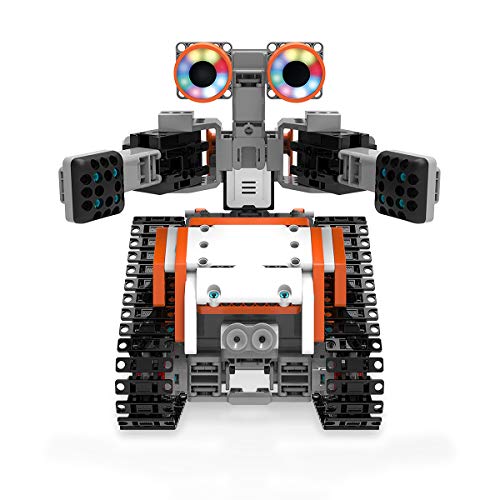
Fly into space with the newest Cosmo Kit from the AstroBot Series. With this kit, you can construct the AstroBot, Rover, or Astron or create your own alien JIMU Robot. But again, there are so many options from the UBTECH Jimu range (including a robot unicorn!), that you’ll be able to find something to suit anyone.
The Blocky coding platform adds to the fun by giving kids the opportunity to code and build these robots to perform countless programs and tricks!
JIMU robots are educational because they can be programmed to help students build their STEM skills at school and home.
This kit does a better job of implementing programming language than others and produces an exceptionally cute robot. Prices range from $120 on Amazon.
✔️ Pros
- It includes 387 snap-together parts, an infrared sensor, and a speaker to make STEM learning simple and enjoyable.
- It comes with a power adapter and a quick start guide to help users search for what they want, and it programs actions using block coding.
- The Blockly coding can help program your robot to navigate obstacles, pick up objects, control light and sound effects, add personality and more
- JIMU robots provide children with an engaging and enjoyable hands-on method of learning that is centered on the fundamentals of Science, Technology, Engineering, and Math.
- It is user-friendly and Compatible with Android and IOS devices
❌ Cons
- Short wires put tension on the connector.
- The motion is not precise
- It is 100% dependent on the Jimu app
Last update on 2026-07-14 / Affiliate links / Images from Amazon Product Advertising API
4. Makeblock Robot
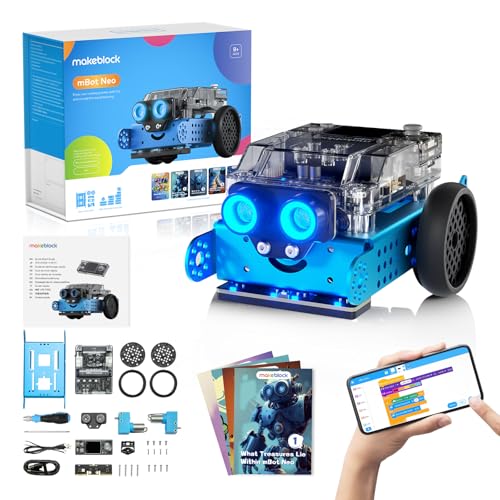
A private Chinese technology firm based in Shenzhen, China created Arduino-based hardware, robotics hardware, and Scratch-based software to provide educational learning tools. Through the use of robotics, programming, engineering, and mathematics becomes easier for kids to learn.
The mBot STEAM education robot is designed for beginning students and makes robot programming easy and enjoyable.
Kids can experience the satisfaction of hands-on creativity by building robot arms with just a screwdriver, detailed instructions, and a study plan.
Because it is a robot, as opposed to some other pre-assembled robots out there, its appearance is homemade.
Kids will find the makeblock kits’ welcoming appearance to be non-intimidating and even attractive.
✔️ Pros
- Supports programming languages such as Arduino C/C++ programming and block programming, allowing it to develop with your child’s skill level
- There is a large online user community, so there are many projects to look at and be inspired by, and also view the comments of other users.
- The robot set is affordable (under $100) and simple to assemble.
- The mBot App allows you to control a robot from your smartphone or tablet, and it comes with a remote control for demonstrations or fun.
- It is compatible with Windows, Mac, Linux, Chromebook, iOS, and Android and includes a light sensor, infrared receiver, ultrasonic sensor, and a line-following sensor.
❌ Cons
- Does not come with a battery for the remote control or robot
- The remote control looks cheap
- mBot design looks simple and unattractive

Last update on 2026-03-06 / Affiliate links / Images from Amazon Product Advertising API
5. Cubit Steam Kits
Cubit’s Voyager is the most comprehensive kit, ideal for exploring the full range of Cubit STEAM-based projects.
The Cubit Workshop drag-and-drop coding program, access to Cubit’s collection of STEAM projects and lessons, and online tutorials are all included.
Through coding, robotics, and STEAM education, the Voyager Kit is intended to inspire and create time for learning just like alternative lego Mindstorms.
✔️ Pros
- Cubit’s modular Smartware design, simple user interface, and robust sensor suite provide students with the freedom to discover their surroundings.
- It provides students with instruments that scientists and engineers use to measure magnetism and spatial position, making it an excellent alternative to lego mindstorms.
- Cubit’s variable-speed precision motors enable students to imagine and put their creations into motion.
❌ Cons
- Comes with 1 rechargeable battery
- Temperature sensors might not be accurate sometimes
- The ultrasonic sensor not functioning properly
Details
Top LEGO Mindstorms Alternatives: A Comprehensive Guide
Why Explore Alternatives to LEGO Mindstorms?
LEGO Mindstorms is popular among educators, hobbyists, and software engineers interested in robotics. Still, looking at alternatives to LEGO Mindstorms can give you options that fit better with different budgets, skill levels, or project needs. Some users face LEGO Mindstorms challenges, such as limited expansion or high prices. Trying out mindstorm alternatives and other competitors can help improve learning and creativity.
Many people want LEGO robotics alternatives that offer more flexibility, lower cost, or better programming features. These alternatives often attract STEM teachers, makerspaces, beginners, and professionals who want systems that grow with their skills. Kits like VEX Robotics, Arduino, and Raspberry Pi provide various programming languages, hardware options, and strong community support. Exploring these alternatives helps find the right tool for teaching, learning, and programming in robotics.
What Features Define a Great Educational Robotics Kit?
To pick good educational robotics alternatives, it’s important to know what makes a robotics kit useful for both beginners and advanced users. Key features include:
- Sensors and Servos: Needed for interactive and responsive robots.
- Processor Power: Affects how complex tasks the robot can do and how fast.
- Programming Languages: Support for Python, C++, or block coding helps learning.
- Software and Hardware Integration: Good kits link parts and programming tools smoothly.
- Versatility and Expandability: Should allow many projects and future upgrades.
- Ease of Use and Durability: Important for younger learners in STEM education.
- Learning Resources and Community Support: Tutorials, guides, and active groups aid skill building.
- Compatibility with Simulation Tools: Lets users practice coding even without hardware.
Educational robotics alternatives like Microbric, Edison, and other STEM kit alternatives offer different difficulty levels for makers and learners. Kits that combine ease of use with powerful programming help develop logical thinking and coding skills well.
Key Considerations Before Choosing a Robotics Kit
Before choosing non-LEGO robotics solutions or robotic kits similar to LEGO Mindstorms, consider these points:
- Budget: Find a kit that fits your budget but still offers good quality and features.
- Programming Languages Supported: Check if the kit uses languages that match your learning or work goals.
- Sensors and Processor Details: Look at the sensor types, processor speed, and memory available.
- Software Compatibility and Apps: Make sure the software is easy to use and works on your devices.
- Community and Technical Support: Access to forums, tutorials, and documentation is helpful when learning.
- Ease of Use and Learning Curve: The kit should be easy to start but also allow growth.
- Expansion Options: Choose kits that can add new parts as your skills grow.
- Target User Level: Some kits are better for beginners, others for professionals or educators needing advanced features.
- Cost-effectiveness: Consider total value, including any extra costs later.
- Use Case: Match your choice to whether it’s for STEM classes, makerspaces, hobbies, or professional work.
Thinking about these factors helps learners and teachers pick the best LEGO Mindstorms options or mindstorms robotics alternatives to reach their goals easily.
Budget-Conscious Options: Affordable Robotics Kits
Finding an affordable robotics kit that fits your budget can be challenging, especially when you want good quality and useful features. Whether you need a cost-effective STEM kit for learning or an inexpensive gift, there are many budget-friendly options available. These kits offer great value without losing their educational or fun qualities.
When looking for an affordable robotics kit, pay attention to the price point, store availability, and online deals. Retailers like Amazon often offer discounts, promotions, and gift card deals through sites such as Extrabux, which can help you save more. Maker spaces also provide chances to use robotics kits with little or no cost, making them good alternatives to expensive sets.
Keep these points in mind:
- Compare prices between LEGO alternatives and other brands.
- Look for package deals including key parts.
- Explore inexpensive options for beginners.
- Choose kits compatible with popular microcontrollers like Raspberry Pi and Arduino Uno.
- Watch for retailer promotions and read customer reviews for trustworthy information.
Affordable robotics kits make STEM education easy to access and encourage creativity and skill-building on a budget.
Finding Affordable Kits Online and In-Store
You can find budget-friendly robotics kits both online and in physical stores. Online shops have many options with frequent discounts, promotions, and customer reviews to guide your choice.
For in-store shopping, local retailers and maker spaces may carry LEGO robotics alternatives and other STEM kits. This lets you see and try products before buying. Some stores have promotions on new tech that works with devices, Chromebooks, smartphones, or gamepads, giving more options.
Tips for finding affordable kits:
- Look for sales and discount codes on e-commerce sites.
- Check shipping fees and return policies to avoid extra costs.
- Read customer reviews to find quality choices within your budget.
- Visit maker spaces to test robotics kits before purchase.
- Use gift cards to lower your initial spending.
By combining online deals and in-store options, you can find cost-effective robotics kits that fit your learning and entertainment needs without overspending.
Programming Language Compatibility Across Kits
When choosing a robotics kit, especially as alternatives to LEGO Mindstorms, it is important to understand programming language compatibility. Different kits support different programming languages and tools. This can affect how easy it is to learn and what projects you can create. Whether you are a beginner or a software engineer, choose a kit that fits your hardware and programming needs.
Many popular kits run on hardware like Arduino Uno, Raspberry Pi, or processors similar to EV3. They often offer free or open-source programming tools that work on Chromebook, iPad, laptops, smartphones, Windows, and Mac computers. This lets you program your robot wherever you want.
Here are key points about programming languages and kit compatibility:
- Python: Very popular because it is simple and powerful. Many LEGO programming alternatives and other kits support Python either directly or through add-ons. It works well for beginners and professionals.
- C Programming: Gives detailed control over hardware and firmware. Kits based on Arduino Uno usually use C or C++ for programming. This language is good for advanced users and software engineers.
- Java and JavaScript: Used in maker spaces and education for their flexibility and strong API support. Some kits allow Java programming, while others use JavaScript through web editors.
- Visual and Block-Based Tools: Many kits use drag-and-drop visual programming environments that work on tablets and computers, including Chromebooks and iPads, for easy coding.
- Integration and API Support: Some advanced kits have powerful APIs that allow custom programming and connect with other hardware and software.
Picking a robot kit that supports the right programming languages and has strong programming capabilities will improve your experience and let you build more complex projects.
Advantages and Disadvantages of Different Programming Languages
Knowing the pros and cons of the programming languages used in robotics kits can help you choose the best one for your needs. Consider whether you want ease of use or advanced features.
Python
- Advantages: Easy to learn, widely supported, has strong libraries for robotics and AI, free and open-source.
- Disadvantages: May run slower on some microcontrollers; sometimes needs extra setup.
C Programming
- Advantages: Offers low-level control of hardware, runs fast, great for projects needing high performance.
- Disadvantages: Harder to learn, syntax is strict, not very beginner-friendly.
Java
- Advantages: Works on many platforms, has strong object-oriented features, has good community support, used in many educational kits.
- Disadvantages: Needs more system resources, syntax is more complex than scripting languages.
JavaScript
- Advantages: Runs in web browsers, great for interactive programs and simulation, works well with web-based tools.
- Disadvantages: Not common for direct hardware control, limited speed for embedded systems.
Visual and Block-Based Languages (like Scratch and Snap)
- Advantages: Very easy for beginners, shows coding ideas visually, great for middle and high school STEM classes.
- Disadvantages: Less flexible for advanced coding, not ideal for professional developers who need detailed control.
Each language has its own strengths and weaknesses. The right choice depends on your skill level, project needs, and whether you prefer simplicity or more power.
Ease of Learning for Varying Skill Levels
Robotics kits are designed for users at different skill levels, from total beginners to experienced developers. How easy a kit is to learn depends on its programming style and available resources.
- Beginners and Young Learners: Kits using block-based coding like Scratch or Snap help introduce programming clearly. These visual tools come with many educational robotics alternatives and STEM kits, perfect for middle and high school students.
- Intermediate Users: People with some coding knowledge do well with Python-based kits. Python combines easy coding with strong features. Many kits have interactive tutorials, good documentation, and active communities to help learning.
- Advanced Learners and Professionals: Software engineers and hobbyists who want full control prefer kits that support C programming, Java, or JavaScript. These kits offer powerful editors, firmware options, and extension support for complex projects.
Teachers and makerspaces find many kits match curriculum standards and include ready-made lesson plans. Hands-on projects keep learners interested and encourage ongoing work in robotics.
Have you tried programming different kits or languages? Share your experience or questions below. We’d like to know how you began your robotics coding!
Tailoring Your Kit: Educational Goals and Curriculum Alignment
Choosing the right robotics kit depends on your educational goals and how well the kit fits your curriculum. Robotics kits cover many STEM topics like programming, mechanics, sensors, servo motors, processors, and AI technologies. Whether you are a teacher looking to explain engineering ideas or a beginner learning coding and robotics basics, picking a kit that matches your needs improves learning results.
Many kits come with programming tools and tutorials designed for makerspaces, classrooms, or home projects. Kits focused on logical thinking and motion control often include robotics simulation and step-by-step instructions. Matching a robotics kit with your curriculum helps students learn key STEM ideas and get hands-on experience with important technologies.
There are educational robotics alternatives to popular kits like LEGO Mindstorms. These offer choices for different skill levels and teaching styles. Choose kits that combine advanced features with easy-to-use controls to help students grow their skills in robotics and science education.
Robotics Kits for Specific STEM Concepts (Mechanics, Coding, etc.)
Robotics kits can help learners focus on certain STEM areas such as mechanics, coding, AI, and sensor use. Many kits teach these topics through interactive projects and clear tutorials.
- Mechanics: Kits with gears, servos, and strong structure teach basic engineering skills.
- Coding and Programming: Find kits with programming languages from block coding to Python and C++. This lets beginners and advanced users learn at their own pace.
- Sensors and AI: Some kits come with sensors and AI processors to teach automation and smart systems.
- Programming Tools: Complete kits offer software and simulators that show how code works before testing it on real robots.
- Makerspaces and Projects: Some kits work well in makerspaces, encouraging teamwork and creativity through hands-on projects.
These focused educational robotics alternatives provide more than just building blocks. They prepare students for real-world STEM problems.
Choosing Kits Aligned with Different Age Group Curricula
Age and experience matter when choosing robotics kits for schools or personal use. Kits made for certain age groups help keep students interested and improve their skills.
- Elementary to Middle School: Easy kits with block coding and simple assembly spark interest in beginners and young students. Examples include LEGO robotics kits and simple building kit alternatives.
- High School and Older Students: More advanced kits support complex programming languages and engineering ideas for future software engineers and coders.
- Classroom Learning and Makerspaces: Kits made for group learning include lesson plans, tutorials, and projects that match different education standards.
- Curriculum Alignment: The best kits fit into formal STEM classes, helping teachers reach educational goals while encouraging critical thinking and creativity at all skill levels.
Using age-appropriate kits like LEGO Mindstorms or its alternatives makes learning robotics and programming easier and more fun.
Long-Term Educational Benefits of Robotics Kits
Buying robotics kits has benefits that last beyond the classroom. These kits help build important skills for future jobs in engineering, programming, and technology.
- Skills Development: Robotics teaches problem-solving, critical thinking, logic, creativity, and teamwork.
- Continuous Learning: Working with programming languages, AI ideas, and hardware helps students stay interested in STEM fields.
- Career Readiness: Early robotics experience prepares learners for jobs in software engineering, AI research, and advanced engineering.
- Versatility: Robotics knowledge applies to many areas in science and technology.
- Professional Growth: Kits used in makerspaces and higher-level classes support skill building for professional careers.
Both educational robotics alternatives and Mindstorms robotics solutions help students build a strong understanding of STEM. This keeps learners motivated over time.
Key Points
Software developers benefit from open-source tools compatible with languages like Java, JavaScript, and Python. These tools extend development and simulation beyond what the proprietary lego mindstorm ev3 software offers.
When looking for Lego Mindstorms alternatives, kits like VEX Robotics, Makeblock, and Robo Wunderkind offer strong choices for both beginners and advanced users in STEM education and makerspaces.
Several robotic kits similar to Lego Mindstorms provide different programming options, including visual coding, Python, and C. These serve well as mindstorms coding alternatives and lego programming alternatives for various skill levels.
For DIY fans, many lego mindstorms DIY projects and lego mindstorms projects use platforms such as Arduino Uno, Raspberry Pi, and Elegoo. These allow more customization beyond the original systems.
Many alternatives include advanced features like AI integration, ultrasonic sensors, camera modules, RGB LEDs, LIDAR, and robotic arms. These go beyond traditional lego technic sets and boost robotics learning for middle and high school students.
Popular platforms like VEX Robotics and Sphero offer non lego robotics solutions known for durability and expandability. They support competitions such as BattleBots and work well in STEM clubs and fab labs.
FAQs
What is better than Lego Mindstorms?
Makeblock offers a wide range of robotics kits for STEM education. They are significantly less expensive than Lego Mindstorm kits and provide a very similar experience.
Why is LEGO MINDSTORMS retiring?
“We have decided to redirect our MINDSTORMS Robot Inventor team and their expertise into different areas of the business,” the LEGO Group said in a statement.
Can I still use Lego Mindstorms EV3?
At the end of June 2021, the LEGO MINDSTORMS EV3 Programmer app will no longer be available in the existing app stores. You may find Labview, the retired LEGO MINDSTORMS EV3 Home Edition for Mac and PC, further down or look for lego ev3 alternative options.
Does LEGO Mindstorm use Scratch?
You can create interactive robotic creations using the motors and sensors included in the LEGO MINDSTORMS Education EV3 invention kit. The possibilities increase when you connect it: you may create your own musical instruments, game controllers, robotic puppets, and anything else you can think of.
What programming language does Lego Mindstorms use?
RobotC is a C-based program that supports numerous platforms and features a fully integrated software debugger. There is extensive online assistance and documentation accessible to interested parties.
Summary
There you have it – the best 5 Lego Mindstorms alternatives available.
Lego Mindstorms, which uses gears and other mechanical parts to build semi-autonomous robots managed by sensors debuted back in September 1998.
Before STEM education became a buzzword in the toy business, it was one of the first toys to explicitly encourage it. Over time, Mindstorm sets and components have been used to make some incredibly powerful creations and the products on hti slist can help you achieve just that or better.